more computer trouble...

Currently reading:
more computer trouble...

Joined
Nov 26, 2004
Messages
15,374
Points
3,233
Location
southend on sea, essex
this time with my dell dimension 3100...

turn it on all fine, few hours later, it starts to errr vroom/hum slightly louder, kick the side and it stops for an hour or so, does this for few more hours then it starts doing it more frequent and ends up doing it non stop, will stop when i kick it but starts again 1 second later.

what is it? lol fan? its all super clean inside so not dust :confused: its not original dell fan its a led one, but its clean as anything, no dust.
 
Could either be you have left a CD/DVD in the drive and it's spinning up and causing vibration or it could be the hard drive. Take the side panel off and listen.

Or of course feel free to keep kicking the crap out of it and make the problem worse, least then you'll probably be able to diagnose it quicker.
 
beau said:
this time with my dell dimension 3100...

turn it on all fine, few hours later, it starts to errr vroom/hum slightly louder, kick the side and it stops for an hour or so, does this for few more hours then it starts doing it more frequent and ends up doing it non stop, will stop when i kick it but starts again 1 second later.

what is it? lol fan? its all super clean inside so not dust :confused: its not original dell fan its a led one, but its clean as anything, no dust.
I had the same problem with my old HP.
Replace the power pack, buy new fans, replace battery on mother board.

Whats happening is that the computer is not ventilated enough so the fan is working over time to compensate, which takes its toll on the power pack. This extra power outage to the fan means your boards are getting less, so the battery (little flat one that keeps ROM alive, and ur system clock ticking :D) will be drained.

By hitting it your just stopping your fan from turning so the noise stops, thing is that it goes quiet but is making things worse inside.

If it hasn't been happening long just take the fans off and give them a good clean. I would still replace power pack though.

Thing is its dell so they may be hard to come by, (read my comment on your other computer trouble post) Dell really are best avoided.
 
Last edited:
if its not getting enough air with the dell fan and 3 other l.e.d fans i fitted in there then its being too greedy! lol is really cool in there! just opened the case, is blooming dusty in there though! lol its the extra fans taking air in from the back and making it dusty!
 
beau said:
if its not getting enough air with the dell fan and 3 other l.e.d fans i fitted in there then its being too greedy! lol is really cool in there! just opened the case, is blooming dusty in there though! lol its the extra fans taking air in from the back and making it dusty!

Two ways to clean dust:

You can use a hairdryer if you have a COLD setting, if not get some canned air from your local computer shop for about £5:eek: , it's costly because it doesn't contain water vapour, which kills your computer.

Jamie.
 
beau said:
if its not getting enough air with the dell fan and 3 other l.e.d fans i fitted in there then its being too greedy! lol is really cool in there! just opened the case, is blooming dusty in there though! lol its the extra fans taking air in from the back and making it dusty!
Although it may have many fans, if the computer is contained in an enclosed space within the computer desk the fans will still be restricted.
 
Beau you have set the fans so that air gets sucked in one side and air gets sucked out the other side? Having them all sucking air inwards is useless!
 
:cry: HELP

the sound is now louder and doesnt stop when kicking now.

its now making a loud tapping noise every 2 seconds like tapping my finger on a piece of wood or plastic.

also its deffinatly not the fans, hard drive it appears.

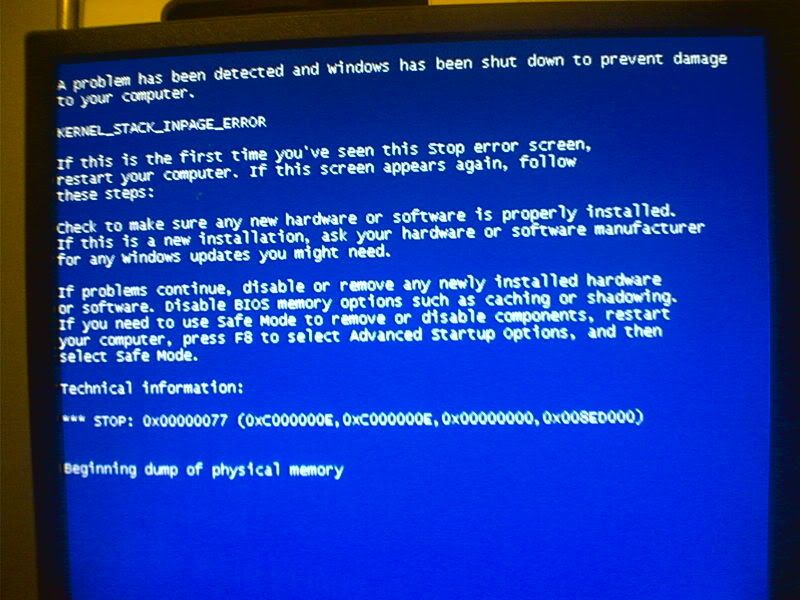
its now displaying this-

Image483.jpg
 
Translation:

Beau's constant kicking of his machine combined with Dell's poorish desktop build quality has resulted in the mechancial failure of said hard drive. Windows has naturally detected this error and has advised the said user never to touch PC's again :D
 
General Protection Fault if I'm not mistaken?

Where do you assume it's the hdd from?

RAM and CPU but more commonly just glitches cos this IMO, fresh install time.

Liam
 
Back
Top