Technical  Continual fan problems!

Currently reading:
Technical  Continual fan problems!

Coopersale

Member
Joined
Apr 10, 2017
Messages
36
Points
64
The fan in my 2012 has always been problematic.
I’ve changed the resistor a few times and the switch, also last time I did the 2 together hoping that would cure it.
I’m away now and the switch overheated then melted completely.
I’ve managed to bypass it with a link so we can have some air con on the way home (from Croatia)
Any thoughts on the cause, when I get home should I replace the fan as well?
Also can anyone point me in the direction of the fuse for the fan?
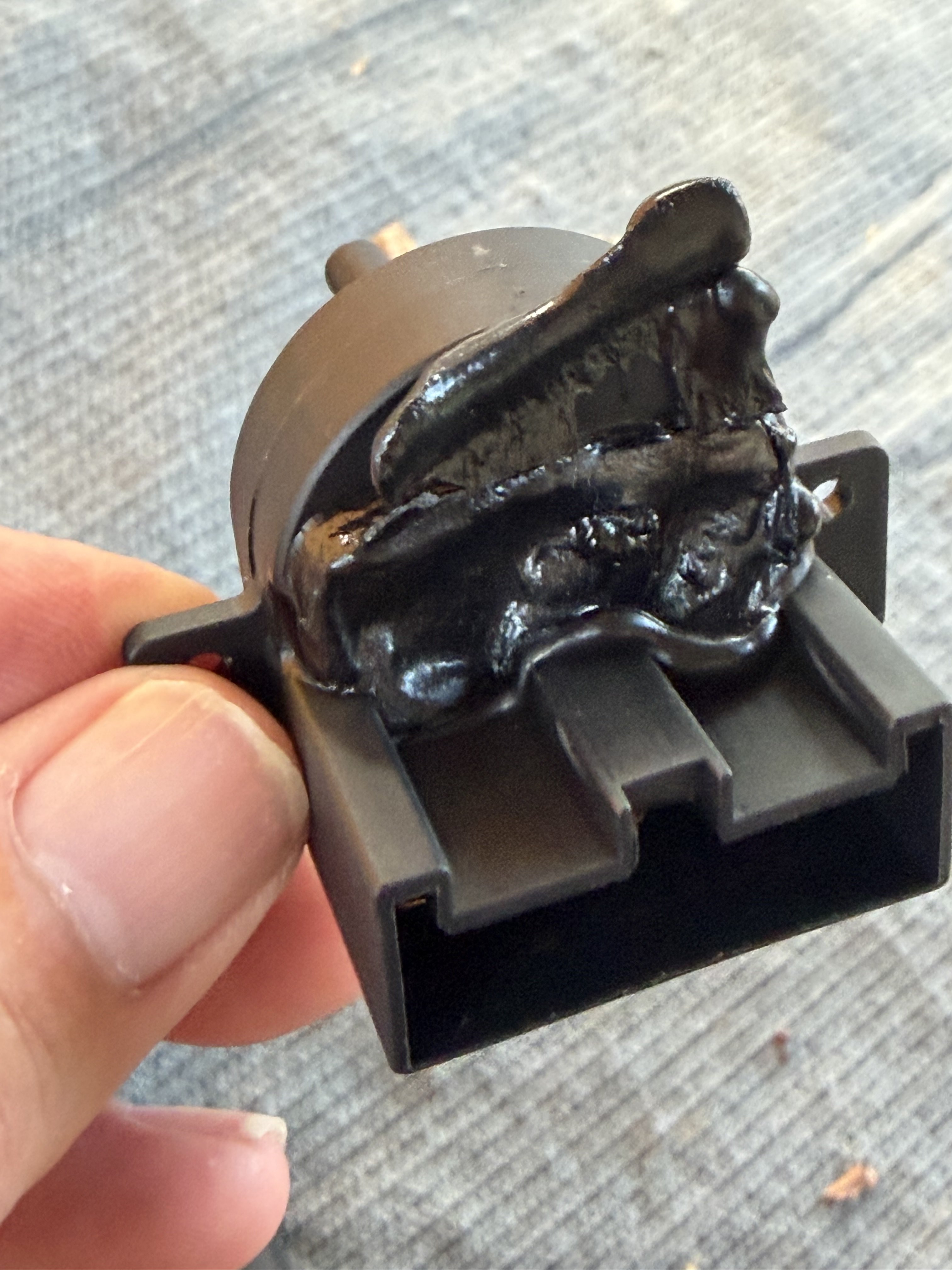

IMG_9187.jpeg
 
Model
X250
Year
2010
Can you measure the amperage/drain the fan motor is taking, to see if excessive and overloading the system.
Apart from that in the old days fans often stopped working due to pro longed lack of use until Winter came etc. So when turned on they often went very slow and noisy, if at all due to dry stuck bearings.
Back in the old days a trick was to spray something like WD40 into the air intake as close to the fan motor as possible, it was often easy to take the fan motor out and oil directly , unlike modern vehicles.:(
Many will not want to do this trick understandably due to the smell etc.
Sometimes it was possible to flick the fan blades and see if motor was sticking.
Back then there were no pollen filters so when you did get the fan to work fast you often got a face full of leaves and debris from the face vents.:)
Another thought, are the switches just sending a signal to the computer to activate built in relays to send power to the fan, or am I over thinking it?:)
 
No the fan is fine, it’s the switch that has melted.
I’ve made a jumper to bypass the switch and the fan blows good.
I am away so having to bodge with whatever I have with me.
IMG_9200.jpeg
 
The fan in my 2012 has always been problematic.
I’ve changed the resistor a few times and the switch, also last time I did the 2 together hoping that would cure it.
I’m away now and the switch overheated then melted completely.
I’ve managed to bypass it with a link so we can have some air con on the way home (from Croatia)
Any thoughts on the cause, when I get home should I replace the fan as well?
Also can anyone point me in the direction of the fuse for the fan?


View attachment 490063
As Mike as suggested stiff fan motor bearings will cause the motor to draw higher currents. An alternative could be higher than normal resistance at the switch contacts, or connections. I note that the switch has been changed, so perhaps the connections? To restate the obvious, once overheating occurs, it gets progressively worse

What is not generally appreciated is that the heating effect of an electric current is proportional to the square of the current, (W=I^2xR) where W is the heat generated in Watts, I is the current measured in Amperes, and R is the resistance in Ohms. To put it more simply a 41% increase in current will nearly double the heating effect.

For the fan motor supply fuse F08 in the engine bay fusebox is designated for climate control, but on my earlier x244 fuse F55, 30A (green) in a cab (LHS) fusebox is shown for the heater fan. As a pointer towards the current involved, it is the highest rated fuse in both of my cab fuseboxes.
 
Hi

You might think in this day and age that fan control would be via a solid-state electronic module. Disappointingly it's still all rather stone age, just a DC motor fed with 12 volts on maximum speed and via a switched selection of high power resistors on the lower speeds to drop the voltage. The resistors waste a lot of power, so have to be placed inside the heater air duct to get an essential blast of cooling air. If they do overheat, a small thermal fuse in the resistor pack pops to avoid a fire risk. You don't want a hot resistor melting its way through the plastic duct just above your shins.

Being only 12 volts, to get any reasonable fan power the currents are high, possibly 30 Amps on full whack.
The snag with high current is that any tarnish or shortcoming in the plug and socket connections which adds a small amount of extra electrical resistance will generate significant unwanted heat. The heat then makes the tarnish worse, until the whole thing gets hot enough to melt.

I suggest you replace the harness connector, or at least carefully clean and inspect the present one and make sure the contacts all grip each other tightly. They can be squeezed slightly with pliers if slack. One useful technique is to spray proper electrical contact cleaner and then mate and unmate the two halves several times to clean up the parts that touch.

This all assumes there is no other fault. As others have mentioned, the current drawn by a DC motor goes up as it encounters more mechanical resistance. So if the bearings are abnormally stiff due to wear or lack of lubrication it will draw more than it should. This can be quickly checked by a garage with a clamp-on style amp meter without disconnecting anything. Also, if there is a restriction to airflow like a clogged filter or those shag pile carpets in the footwells, there might not be enough air flow to keep the resistor pack from toasting.
 
Back
Top