

[DISCLAIMER]
I am not responsible for any damage made to the car or the radio. I followed the below operation and everything worked fine. Everything you make is your own responsibility!
--------------------------------------------------------------
So you've got tired of your old radio and you also want to have a beautiful stock look without spending too much money? You can buy a second-hand stock unit from another person. I bought mine at 40 euros + 10 euros shipping. It is in perfect condition and it also plays mp3.
But, because the car wasn't equipped with this radio, the cables CAN A and CAN B are missing.
As a result the message "CANCHECK" appears and you can't operate your new radio. :bang:
GOOD NEWS! After some research, i've found the solution and everything works fine.
What will you need:
Once you acquire them, you can move to the second part of the guide!
I am not responsible for any damage made to the car or the radio. I followed the below operation and everything worked fine. Everything you make is your own responsibility!
--------------------------------------------------------------
So you've got tired of your old radio and you also want to have a beautiful stock look without spending too much money? You can buy a second-hand stock unit from another person. I bought mine at 40 euros + 10 euros shipping. It is in perfect condition and it also plays mp3.
But, because the car wasn't equipped with this radio, the cables CAN A and CAN B are missing.
As a result the message "CANCHECK" appears and you can't operate your new radio. :bang:
GOOD NEWS! After some research, i've found the solution and everything works fine.
What will you need:
- Double cable approx. 1 meter (if you cant find double, just get 2 normal cables at the same size)
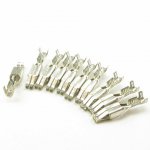
- 2x iso connectors like in the image below. It will be better if you can find connectors with the wire attached already so you will win some time
- Multimeter (maybe)
Once you acquire them, you can move to the second part of the guide!
Radio Connection
It's time to connect the radio!
First, disconnect your old radio removing all the cables and the plastic bracket at the center console (4 torx screws)
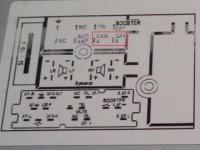
This is the schematic of the stock radio pins. As you can see we have to insert the CAN A and CAN B cables at their positions.
Your iso plug will look like this
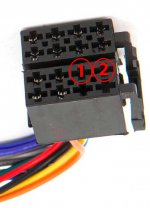
Take the iso connectors that you've bought and connect them to a cable if they came without one. Next, insert them in the plug at the positions 1 and 2 as shown at the above image. You should hear a "click" and then you are good to go! (The insertion is made from behind to the front)
Now, join the 2 iso connectors to the big cables that you bought. (It is better to also solder them together instead of twisting and using duct tape)
Mark the cables to be able to distinguish them. The cable inserted at the position 1 marked at the above image is the CAN A cable and at the position 2 is the CAN B cable.
OBD2 Connection
An easy place to find the ports for connecting the cables is the OBD2 port at your fuse compartment.
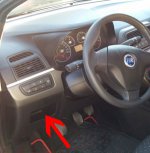
Pop out your fuse cover down the steering wheel and you should see the obd2 port. Open it's cover and the port is exposed.
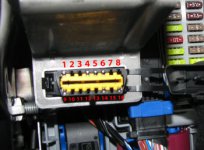
The cables must be connected to the 1 and 9 port as marked at the image. The easiest way is to stick in the CAN A to the port 9 and the CAN B to the port 1
If you want something permanent you should find the cables of the ports 1 and 9 behind the obd2 port and connect them to their respective cables as i told you from the radio.
When you finish, close all covers, connect all plugs to the radio and put it inside the console.
IMPORTANT!
Some aftermarket radios have different pins for power, antenna, ground etc. Before inserting the stock unit, use a multimeter to see if they are correct looking at the schematic above.
Time for the last part!
Testing
Turn your key to the MAR position. The radio should open asking for code!
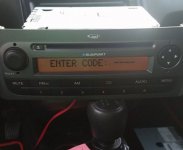
Insert the code that the seller provided you and voila!!! It works!
Don't try to insert codes in random because each time you insert a wrong code you must wait to enter it another time and after 10 wrong attempts the radio will be blocked.
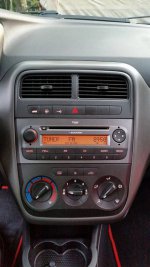
That's it! Enjoy your new radio!
Something more!
Because the radio is from another car and we connect it to our CAN network, the mileage will flash at your dashboard meaning that something is wrong. That's because the radio is "foreign" to your ECU. It is usually fixed with a "PROXI alignment". Your local dealer or garage will be able to fix it conencting your car to a computer and making the alignment.
That's all! I hope that it is helpfull. Please send any questions or remarks below. Thank you.


