internet problems

Currently reading:
internet problems

sportingsmissus said:
oh an if i try log into msn messenger it says that my gateway is offline :confused: :confused:

any further suggestions would be appreciated


Is your computer connected directly to the internet or is it shared?

If your Gateway is offline then your TCP/IP settings have been messed with.

Please wait...When you get to the 2nd Dialogue box press on Advanced and make sure there is NO Gateway Do this and make it looks something like that
 

Attachments

  • config.jpg
    config.jpg
    486.3 KB · Views: 42
Last edited:
sportingsmissus said:
there are loads, is there any inparticular that shud or not be there?

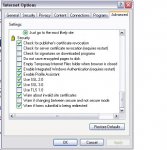
Mines is like below but I'm on XP, what OS are you running and what IE version? Are you fully up to date with updates from MS?

Liam
 

Attachments

  • Settings.JPG
    Settings.JPG
    42.6 KB · Views: 32
:eek: doesn't look like im gonna get this sorted ny time soon.

its sooo stupid! though am glad can get on some sites just not really the ones i need :(
 
bizarre,

So you can access some websites but not others. This would suggest that you don't have a problem with the browser, but perhaps something else lurking on there.

What is your default home page when you start Internet Explorer? Sounds like something lurking on there stopping you getting to some sites.

Did I read that you have done a system restore though? if so, the problem is not on the pc.

I know that my hardware firewall has the ability to filter websites. If you have one like that, has someone been helpfull and added some entries to this?

One good test, from a command prompt try to ping the hosts that you can't reach.

It's important to test for connectivity before you worry about the browser not being able to connect to the site.

So, in a nut shell

Start
Run
type in 'cmd'
click ok
type in ping www.bbc.co.uk
you should get a response from that
then try the same with web site you can't access.

Hope that helps.
 
if i were you id download mozillafirefox off albinoblacksheep.com and install it as your default browser. you can also download spybot and ad-aware off the same site which will clear your comp off any spyware which may have hijacked your browser. its no harm having these applications on your comp anyway,theyre totally free and work a treat.

regchecker off downloads.com is also useful.

might be worth a try.....
 
i know she has spybot and addware on the pc already and run them both to try and resolve it!

if im right in saying this its not that she cant access the sites its that she cant *LOG INTO THE SITES* which is why it is so strange!

oh except msn which as she said it keeps saying no gateway!
 
well hotmail.co.uk is one of them. can get on the website but when you enter email address and password it goes to 'page cannot be desplayed. my.shu.ac.uk does the same thing when you press log on/in! and nationallottery.co.uk when you try and log in! (btw sportingsmissus hasnt changed sex lol im trying to sort it for her to, imon her laptop atm)
 
honestly i did that many different things i couldnt tell you which one worked.
i think it was some software that had been uninstalled but not completely and it didnt like it! but it took forever to get rid of the little bugger! now i have reset most things to default, deleted all software that wasnt needed and installed a 90 day trial of norton antivirus/firewall. and when that expires i have panda internet security trial that i can start! lets see how it goes.
 
yep, u did. shame it took forever though but sooo happy :D

thank u :)

and a big thank u to everyine for their suggestions they were appreciated!!1
 
Back
Top